Lets Update You with the relevant information in daily tech Solutions, News, and a few hack tips. Contact Us Now for : - Professional website development. __________________________________________ Tel: +256-704-359-301 Or: +256-776-359-3012
Tired of reading and learning a lot and still you
want to learn JavaScript faster? well that no longer a problem
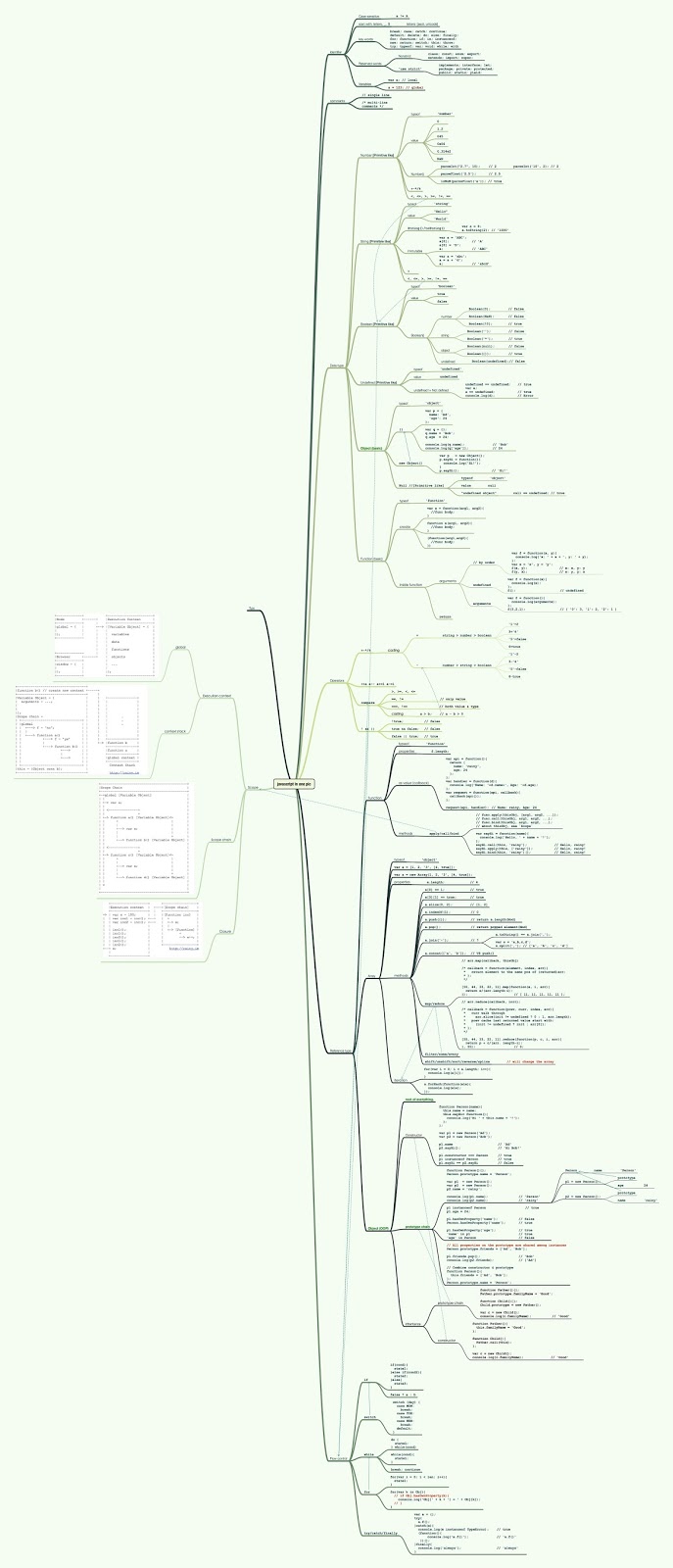
because a developer called Yushenge has created an infographic that
will show you javaScript in one image. It not only help you to learn
faster but it also help you to see how simple and powerful JavaScript can be.
Alright here is the image.
There it is all you have to do is to save the image and enjoy seeing how faster and easier learning JavaScript can be with this image . Well ENJOY hole you love it
If you need a Website Designed for you: Please hit us up at ElitNex Website Developers We are real great at it.
Let's create professional Social Media Posts for your Business at as low as UGX 75K ($23).
Social Media Marketing has never been this simple, fast, and affordable: www.socialclark.com
------------------------
Many people are complaining about the low performance in windows 10 since it got release the number of after the official luck of windows 10 many people have upgraded their PC to windows 10 because its free but the number of upgrades have decreased compare to other previous windows.
here am about to show you a way you can work that out and solve the issue of slow performance ,
they are has been a lot of complain about this issue
HOW TO FIX THIS ISSUE
This slow performance mostly appear when you click the start button it take some time before appearing and so on let see what we can do to prevent this next time you click.
this issue could be fixed by tweaking the Page File settings in Windows
10 that affects and improves the overall system performance. Here is how to it
1. Open the start menu and click the control panel
2. When on the control panel go to search field and type in performance and hit enter.
3.Now find Adjust the appearance and performance of Windows.
4. Now after that you need to go to advance tab and click change in the virtual memory section
5.Now uncheck the option “Automatically manage paging file size for all drives.”
6. After that you need to select the drive where windows 10 is install in this case it drive C: and click customize. then Then change Initial Size and Maximum Size to the recommended values by Windows like the ones given bellow .
7. Now after all that you now need to click on Set and then click on OK and there you go you have done one more thing you now need to restart your computer the changes to take effect and solve the problem .
And there you go sir believe me or not you have fixed the issue. Enjoy.
In partnership with the Indian device maker iBall , Microsoft made a
fully functional pc on a stick more like a flash drive , this flash
drive is meant to turn your smart TV in to a fully functional computer.
after connecting this device on the smart TV,
In partnership with the Indian device maker iBall , Microsoft made a fully functional pc on a stick more like a flash drive , this flash drive is meant to turn your smart TV in to a fully functional computer. after connecting this device on the smart TV, which will be connected through HDMI port you will access a fully PC running windows 8.1. The iBall Splendo that the name of the device it came with a wireless wireless desk set including a keyboard and mouse so you get a full experience of a PC
At its launch, Microsoftsaid: “The iBall Splendo is for people who love devices and want to be connected all the time using multiple form factors.
The iBall Splendo runs on the Intel Atom Quad-core processor with 2GB RAM and 32GB storage space a multi-channel digital audio, a micro SDXC slot, USB port, micro-USB port, Wi-Fi, Bluetooth 4.0 and HD graphics and it come with one year warranty
the price is 140 $ that is 497,980 UGX .
About shipping the iBall splendo will start on july in india still unclear yet of it release in other part of the world but this is really good device comouter are getting more and more smaller if you don't know what am talking about just take a look at the first computer, that thing could fill the whole house
Anyway hope you like it, let us know what you feel about this one .
Many people ask them selves why there cn't just be a download link on
youtube video . well that is because Google has not implemented any
official download option to protect copyrighted videos. But as you know
there is always a way so there is a way a simple way that you can
bypass that and download the videos just like there was link .
Here is how:
1. first you need to open the video that you want to download for example i want to download this video
Notice that i have got a download link just beside subscribe link well don't be surprise you will also get one of those in a sec .
2. After you have got the video that you want to download you now need to go to the address where the video link is and add ss just infront of youtube like in the picture bellow .
after adding those two ss press enter
you will be taken to a website that will generate your download link
3. whe you are on that website you need now to go down and select the website where your video was from let say if you you downloaded the video from youtube then you need to click on youtube link just below there are a lot of video websikte link over there just click on the website where your video is from in my case my video is from youtube so am going to click on the youtube link
4. you will be asked to install their add-on go ahead amd install it it will be integrated on your browser . after integration you will get a successful download like the picture below .
6. After that you are done . now all you have to do is to go to the website where your video is and when get to your video you need to look at your browser task bar you see a button for the integrated website , just click on it to call the helper menu you will get a menu like this one
After that you are ready to go all you hev to do is to look your vidoe for your download link click and your donwload will start right after clicking .
Windows 10 is a new version of windows out and it came with .NET
framework 4.5 pre-installed, but many apps developed in Vista
and Windows 7 era require the .NET framework v3.5 installed along with
4.5. These apps will not run unless you will install the required
version. When you try to run any such app, Windows 10 will prompt you to
download and install .NET framework 3.5 from the Internet. However,
this will take a lot of time
You can save your time and install .NET
Framework 3.5 from the Windows 10 installation media. This method is
much faster and does not even require an Internet connection. Here is
how to install it.
Here are the steps to install .NET framework 3.5 in windows 10:
1. Insert your windows 10 DVD or any way you are using to install windows whether it a bootable flash drive with windows doesn't matter what you are using it will all do the job just fine
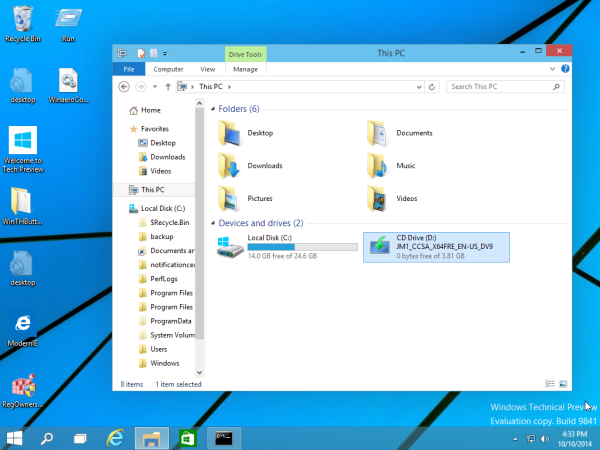
2. Open 'This PC' in File Explorer and note the drive letter of the installation media you have inserted. me m using disk D: it might not be the same as your but it still the same.
3. after that you need to open an elevated command prompt you open an elevated command prompt by opening the command prompt as administrator
4. Now copy the given code in the command prompt exactly as it written but change the letter D: with your drive letter that you are using
you can also use this batch file to make things smooth and fast depending on what you want anyway .
@echo off
Title .NET Framework 3.5 Offline Installer
for %%I in (D E F G H I J K L M N O P Q R S T U V W X Y Z) do if exist "%%I:\\sources\install.wim" set setupdrv=%%I
if defined setupdrv (
echo Found drive %setupdrv%
echo Installing .NET Framework 3.5...
Dism /online /enable-feature /featurename:NetFX3 /All /Source:%setupdrv%:\sources\sxs /LimitAccess
echo.
echo .NET Framework 3.5 should be installed
echo.
) else (
echo No installation media found!
echo Insert DVD or USB flash drive and run this file once again.
echo.
)
pause
How to use it : just copy the text given, past it in notepad give it a name and save the file as .cmd
Note: don't forget .cmd when you are naming your file or nothing is going to work and then open it as administrator it should be open as administrator or it not going to work .
Hope you enjoy.
AD ----------- Let's create professional Social Media Posts for your Business at as low as UGX 75K ($23).
Social Media Marketing has never been this simple, fast, and affordable: www.socialclark.com
Let's create professional Social Media Posts for your Business at as low as UGX 75K ($23).
Social Media Marketing has never been this simple, fast, and affordable: www.socialclark.com
------------------------
If you live around Kampala, chances are you have already been moved from the digital electric meter to what UMEME calls "YAKA" If UMEME hasn't brought YAKA to you"YET", you can be sure they are soon at your door step any time from now.
This article is only for educational purposes and so i won't be held responsible for your actions.
In this article, there comes lots of theories and just one proven method to hack the YAKA prepaid meter.
So, What is Yaka Really?
Yaka is an electric meter particularly made for UMEME by a company based in South Africa called Conlog to reduce on electricity hacking and get ride of their meter readers pay role. However, after all this time in deployment, YAKA is after all not a full-proof solution for UMEME. how? UMEME as a company doesn't really make these meters. All the work is done in South Africa by a company called Conlog. You want to hack YAKA? Conlog is the real deal. Here is an article that was written by Conlog in 2011 when it all started: New business methods in Uganda
As these guys' website say's "Conlog has been leading the prepayment industry for more than 20 years. Our solutions bring the best in metering,
vending, revenue management and associated support services, to ensure the sustainability of your project, now and tomorrow... "
Really you got to give credit to these guys.
Now. getting into the Hacking, In a video, I found online, I gathered that one has to actually open up/ break into the casing of the system if they wanted to hack it
In the above video, A technician at Conlog South Africa takes us through how conlog meters are made and somewhere along the lines he mentions something about how to get through it. Even though most of these meters are tamper-proof in that it might not go back together as it was after you break it.
Apart from this hack, there are a lot of theories including something i mentioned in my previous How To Hack A Weel meter which is Adding strong magnets side by side which personally I don't think will ever work since nothing metallic actually determines the electricity usage. I will outline and maybe talk a little of what i know about a specific theory and then I will give you something that actually works. and actually worked for a few people I know however later ware caught and hard to pay a few fines.
This article is only for educational puposes and so i won't be held responsible for your actions.
Theory 1: Attacking a smart meter’s memory-through hardware.
Theory 2: Using a digital radio to Hack a Smart Meter
Theory 3: Accessing the meter with a wireless Device
Theory 4: Spreading malware to the Smart Meter’s network
Theory 5: Measuring the Smart Meter’s electrical consumption
Personally i didn't find any of these really help full but maybe some one out there could check it out and may be find a more effective hack. I call them theories because i didn't relate any to our country and, quite honestly i don't think of YAKA as a Smart Meter. Its just a prepaid electricity device that was introduced to Uganda a few years ago.
The Yaka meter in your house is just for outputting and inputting data, like typing in your token, and displaying how much you have left. Actually, the real magic happens up on the electric pal on that box/s hanging and that's where your meter in the house gets and puts all its information. so you could say if your credit is due, your meter only sends a signal to the big box on the pole through the wiring and then, its the circulate breakers job in that box to turn your power off. even when you load a token, the meter only sends it to the box, then the box again, Does the magic to calculate how much the code you brought has to give you. Don't be fooled, those meters don't have a network system otherwise they wouldn't have wires from the pole's box. i have hard people talking about how the meter is connected to umeme offices but think about it, Those guys can only tell when you last bought or loaded a token and all about the previous purchases, but they cant tell how much electricity was used in a day or a satain week. Now did you know that if you call your phone number's service provider and ask them how you have used your credit they will give you full details of when and what you used it, But UMEME can't. and that's one of the reasons i don't like to call it a smart Meter otherwise i think every smart device has got to have network/internet. Ok what does all this lead us to,
We know that all the math and magic is done on the big box on the poles. But how do we get to it, If you are human enough, also not a professional electrician, am sure i don't have to tell you it's just crazy climbing an electric pole. So please don't. as i said, this is only for educational purposes even though you may get some professionals to climb and confirm for you. I may self haven't been up there but i am telling you this after a long time of research and I have seen this working in a few places.
Now for the steps.
Again: This article is only for educational purposes and so i won't be held responsible for your actions.
After climbing that pole, What you need is anything that can cut through an electrocuted wire and a non-conductor of electricity.
Step 1: Trace for the big-black wire that brings power to your house.
Step 2: Find the pole on which it's attached. [One of the wires in the big wire should go directly to the box which then moves on out to a live wire on the pole]
Step 2: Cut the live wire to the box from the black wire of your house [Red]. After citing it from the box, the meter at your house should power off
Step 4: Connect the wire you cut to the same red wire the box is connected to [the wire that passes power through the box]
At this time, power comes to your house. But this time, all Free. Any electricity used after this will be free. Enjoy!
Note: The wiring will not be the same for all cases. In some places, several houses can be connected to the same box on the pole. In this case, refer to "How it works" below.
How this works:
In this trick, all we did was to bypass the system in the box at the electric pole. So the meter will think the power is just off and so causes it not to calculate any more power.
For the case of a number of houses connected to the same box, just identify your own wire and find a way to bypass that box.
Like i said: This is only for educational purposes and so i won't be held responsible for your actions. and be care full.
AD ----------- Let's create professional Social Media Posts for your Business at as low as UGX 75K ($23).
Social Media Marketing has never been this simple, fast, and affordable: www.socialclark.com
If you have been wondering why your analog TV is off, You are not the only one. And if you live in Kampala, you probably have heard of "Digital Migration" at least once.
Below is the UCC (Uganda communications commission) official statement.
In light of this International deadline, the Commission shall be carrying out a phased switch off from 15th June 2015 leading to the period of total switch-off of analogue transmission in the entire country. The Commission is currently monitoring for any interference by analogue signals of the Digital signal at all of Uganda¡’s border points. The Commission hereby informs you that it is satisfied with the current digital terrestrial coverage that has existed for the past 18 months in Kampala and areas 60 (sixty) Km outside Kampala.
the UCC has made planes on switching off analogue in Uganda as a whole by the end of September as this was only done in Kampala on the 15th of this moth. Below is the time and region of switch off for the whole of Uganda. 15th/06/2015 - First was Kampala 31st/07/2015 - Second will be Arua,Masindi, Mbarara, masaka, Kisoro, Hoima and Mbale
31st/08/2015 - Lastly, analogue will be turned biza in Lira, Gulu, Fort Portal, Rukungiri, Ntungamo, Soroti, Jinja and Kabale
In a few days from now we'll be showing a way to watch Digital TV Completely free.
AD ----------- Let's create professional Social Media Posts for your Business at as low as UGX 75K ($23).
Social Media Marketing has never been this simple, fast, and affordable: www.socialclark.com
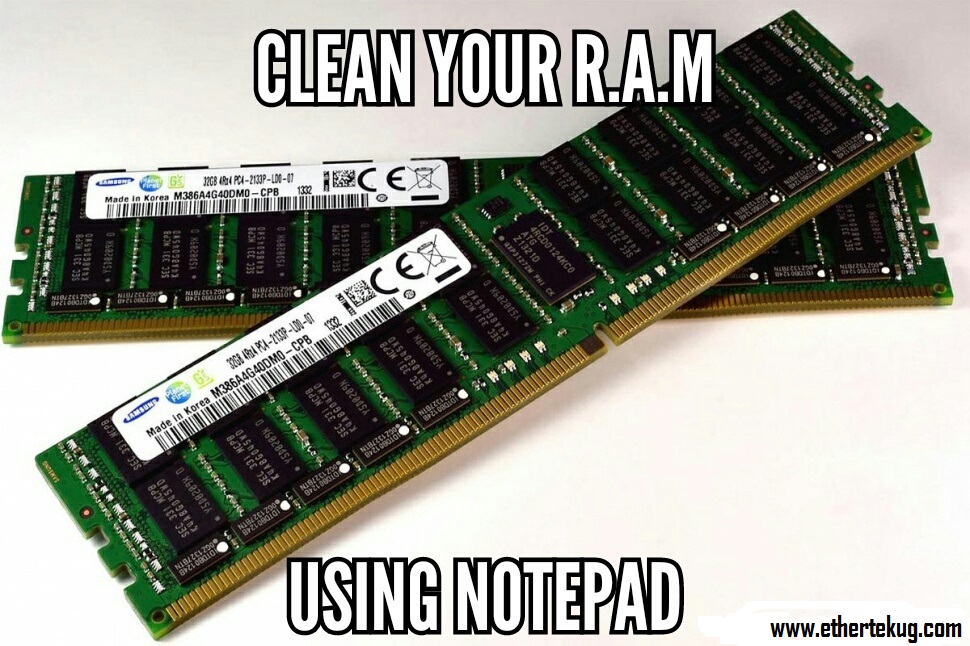
Some time you may get a computer crash just because your ram is overloaded with data and you just ask your self how you can clean it out well that won't be a question anymore because you are about to learn how to do it by your self without any software.
Here are the step to clean your RAM using notepad:
1. open your notepad
2. type in the following code exactly how you see theme here: FreeMem=Space(10240000000)
3. save it as CLEANER.VBS to any location you want and any case you want i just wrote it in upper case so that you see it very well
4.You can edit the code and write 512 instead of 1024 if you own a 512mb RAM or change to anything you like.
5. Run it
6. Sit back relax have a cup of coffee let it do it thing; ENJOY
If you find this tutorial useful leave us a comment bellow
Have you ever thought about having access to your computer at home when your are away? let say maybe you just found out that there is a file that you should have taken from your computer but you forgot to take it and you just found out that you forgot it when you are already 3 hours away from you home.
well you don't need to worry about that anymore because if you are reading this right now then believe me this is the right place .
There are many ways through which you can access your computer from anywhere
1. TeamViewer
Teamviewer is extremely popular and free software that is used to access remote computers. It has a multitude of options and requires only that you have the Team viewer client and a working Internet connection on both ends (the host which is the other computer, and the guest computer, which is you in this case).
First of all you need to start by downloading the team viewer software from the official Team Viewer website
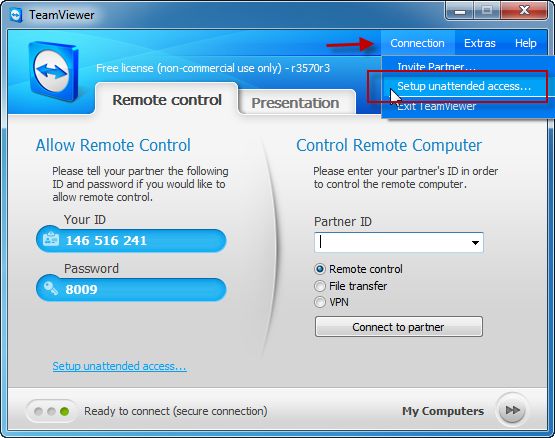
Now on the picture above the area you see with red box on the left you will see your 9 digit ID and a password. These are all anyone with Teamviewer requires to access your PC remotely.
you can only share those with people you trust
Step 1: On the Teamviewer main windows, click on Connection -> Setup Unattended Access.
2.click on the next button
After clicking next this will bring you a window where you can set your computer name and password for remote access.
3. you will be ask if you want to create a teamviewer account but you can leave that aption if you want to create it later.
4. after clicking on the next button you will be taken to the last screan of configuration and after this screen you will be ready to use you teamviewer and access you computer .
as you can see this screen list you TeamViewer ID.
How to use teamviewer after set up .
Step 1: To use the unattended access you just setup, enter your ID in the Partner ID field, and click on the “Connect to Partner” button.
Step 3: you will be prompt for a password just go ahead and enter the password you just created during the setup and click "log on " button but you can also click on andvance to select the type of access you want
Teamviewer is available for Windows, Mac, Linux and mobile devices. This means, you can access a Windows PC from Linux or a Mac from any mobile device. The platform does not matter. However, both the endpoints must have Teamviewer installed.
How to get remote access to you computer using Google chrome.
1. Click Google Chrome on your desktop or laptop.
2.Go to ‘Apps’ nearly at the top of the screen.
3. Click “Web Store”
4. In the search panel, type “chrome remote desktop”.
5. In the app results it will show as added.
6.Go back to the apps page again.
7.Click the desktop icon named as “Chrome Remote Desktop”
I am an open minded person with a great interest in computer networks, programming and cyber security. My love for computers started way back since elementary school where I din't have access to the internet nor did I have a computer at my disposal. In the long run at the right time, the love I had for so long was taken to the next level when I was granted internet access and mostly, A computer at my disposal. This allowed me to develop and enhance my skills more effectively. Currently on a cyber... Continue Reading
To all those that visit. We highly appreciate. Thank You!












 Do you like what you see?