Questions? Feedback? powered by Olark live chat software
| Get: Our Articals In Your Email | Get: 120 Important Softwares all on DVD | Buy a VPN Or Proxy to get free internet | Contact Us


Ads 468x60px

Thursday, 11 September 2014

How To Colorize Your Folders with Different Colors In Windows

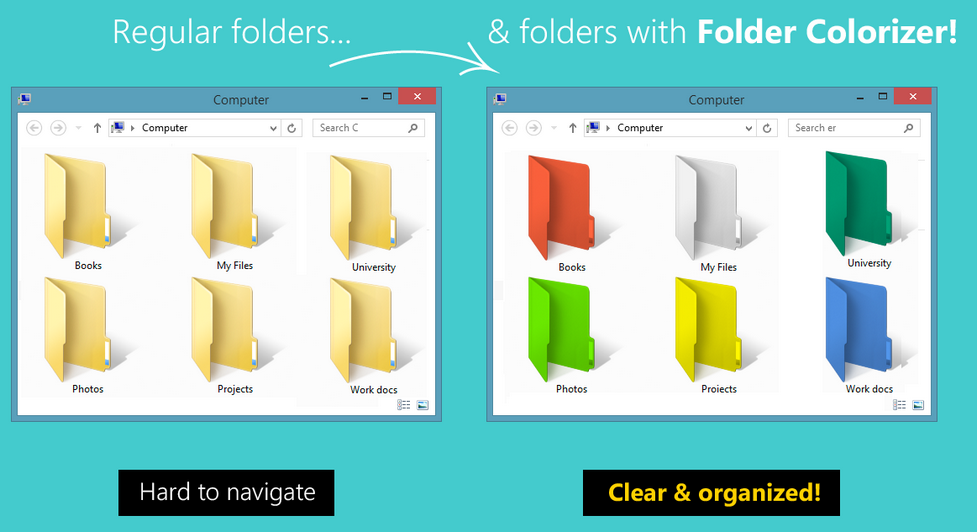
We all Know windows Folder color is always light yellow by default, Today am here to show you a way to customize and organize any folders with different colors.


With this amazingly small software, you can colorize folders in windows with any Color of your choice very easily. some people find it difficult to navigate to the folder which they want because folders are all of the same Color and if you forget the name of the folder in which you stored your important file.
This will not only help you Pick the folder you want without remembering it's name but it will aslo spice up the looks. Windows explorer really looks fun after giving colors to different folders. Now let's talk about the 3 easy steps involved.

Step 1:

First, Download a small software that we'll use to assign colors

http://softorino.com/deploy/FolderColorizerSetup.exe


Step 2:

Install it and navigate to any folder that you wish to assign Color. Right Click on that folder and you will see Folder colorizer Integrated in the Context Menu.

Step 3:
Hover your Mouse on Colorize and Choose your Favourite colorand you should see that partticular folders color change to your favorite color

Done. And now all you have to do to color other folders is repeat same process in step2. .


That's it for today. You may like our Page Here: www.facebook.com/ethertek

You may also Read: How To Create A Folder Windows Can Not Delete Or Rename

Continue Reading...

Saturday, 6 September 2014

How To Know If Your Phone Is Made In China

<<=========== RUUT.ug ===========>>

Ethertekug.com has been shifted to  www.ruut.ug and will make NO MORE Posts.

PLEASE VISIT: WWW.RUUT.UG

<<=========== RUUT.ug ===========>>


Below are characteristics of phones made in China or should i say Fake Phones


Really, Don't take this for serious some china phones are fine, I am sure most of us are familiar with the term "China Phone" actually means "Fake Phone". One time a friend told me he made a google search of "Fake Phones" and The results Said: "Did yo mean Chines Phones?" As phones have evolved, Chines phones have stayed fake especially in Uganda.

And here we go:

1. It gets full after 3 minutes of charging..

2. The phone has TV, Touchscreen, Nail cutter, fire lighter etc.

3. Text message can be written with a toothpick.

4. There are some spelling mistakes e.g NokLa, blackderry, i-porn, samswag etc.

5. When an aeroplane passes by it records"one missed call"

6. When a big truck hoots; it records "charger connected"

7. When a Chinese man passes by you it says "one Blue tooth device found."


More from here: www.facebook.com/ruutmag

Also see: SMART PHONES: Why you Need One, Which One & Where To Buy One


<<=========== RUUT.ug ===========>>

Ethertekug.com has been shifted to  www.ruut.ug and will make NO MORE Posts.

PLEASE VISIT: WWW.RUUT.UG

<<=========== RUUT.ug ===========>>


Continue Reading...

How To Disable USB ports On Pc To Avoid USB Viruses And...

Make your PC invulnerable from data theft and malware which spread through USB ports. This works on Windows XP, Windows Vista, Windows 7 and Windows 8.

With this trick, you can disable access to your USB (Universal Serial Bus) ports on your Windows based computer to prevent people from taking out data without permission or spreading viruses through the use of USB (pen and flash) drives.

Follow the steps given below:-

Steps:

1. Click on Start >> Click on Run. If you cannot find RUN just type it in the search box.

2. Type "regedit" without quotes. This will launch the Registry Editor./>

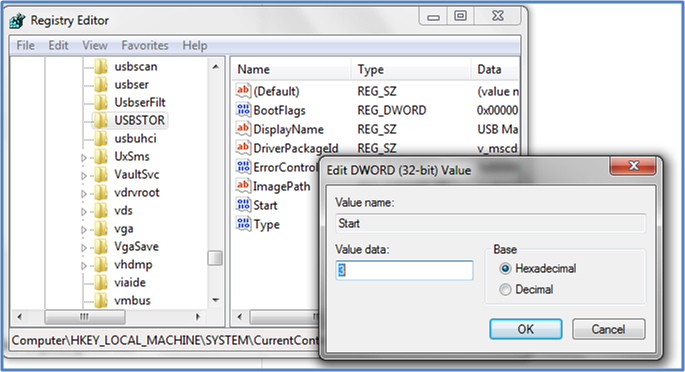
3. Navigate to HKEY_LOCAL_MACHINE\SYSTEM\CurrentControlSet\Services\usbstor.


4. In the work area, double click on Start and In the Value Data box, enter 4 click OK

You are Done. Now just Close Registry Editor and refresh your desktop. That's it.
And  now if any one trays to enter their UBS disk, It just doesn't work.

Help?

To Re-Enable access to USB ports, Follow the same proccess as above but enter 3 instead of 4 in the Value Data box.


WARNING: This trick will also disables access to your USB connected peripheral devices. So, do not use it if you have USB connected keyboard and mouse.
Continue Reading...

Google Is Building The Fastest Computer On Planet Earth

Google wants to take computing to warp speed and so what better way to do this than do exactly what they just did. Google has partnered with UC Santa Barbara researchers to develop quantum computing

The internet search company announced a new partnership with researchers at the University of California Santa Barbara to develop "quantum computing" technology.
What is the science behind quantum computing? : This is a highly technical though still very theoretical. In simple terms, quantum computers make use of quantum bits, or qubits, to process information, as opposed to the binary system of ones and zeros used by traditional computer processors.

Scientists say qubits can behave like ones or zeros, or both. In theory, this should make quantum computers exponentially faster than digital computers that use a binary system to process information.

China is currently, China is home to the world's fastest computer, "The Tianhe-2" supercomputer, which is capable of nearly 55 quadrillion of calculations per second. After the development of quantum computer, 55 Quadrillion could look really snail.
The Partners have said they will form a "quantum artificial intelligence team," to lay the groundwork for quantum computing.
Before this, Google heard already been working with scientists at D-Wave Systems on a quantum computer system developing what some call the first commercially viable quantum computer, "The Vesuvius" Google is also working with NASA on a 1,000 qubit "Washington" processor.

Wishing these guys a success. Surely at the end of it all, We all need a faster Computer.

Also Read:  SMART PHONES: Why you Need One, Which One & Where To Buy One

Continue Reading...

Friday, 5 September 2014

SMART PHONES: Why you Need One, Which One & Where To Buy One

<<=========== RUUT.ug ===========>>

Ethertekug.com has been shifted to  www.ruut.ug and will make NO MORE Posts.

PLEASE VISIT: WWW.RUUT.UG

<<=========== RUUT.ug ===========>>


In the last ten years alone, phones has evolved at a really high speed than any other Technologies moving from just making basic calls and texting to much more complex tasks

Today, smart phones have become a necessity to almost all ages. A necessity that the youth have grown to make a must have. Smart phones have been made to take on tasks of other gadgets. Smart phones now have better camera pixels close to those of digital camera's, combined with FM-radio and Alarm clock, Stop watch,Video & Audio Player, Voice recorder, Calender, as well as a torch that also acts as the camera's flash light, mathematical calculators, notepad, ETC

HTC-M8, SAM SUNG GALAXY S5 and SAM SUNG NOTE 3, IPHONE 6, LG-G3,Nokia Lumia ETC. These are Leading Smart Phone Brands.


well me myself,I have had a chance to use a smart phone for sometime until it was stolen but it was worth every penny that i bought it! The advantage with smart phones is that they have the ability to multi-tasking(

Wondering which brand of a smart phone you should buy? well as we know each and everyone of us have different taste and preference. You should be in position to know why there exists so many brands of smart phones on the market all competing for your choice. As for me i have used and liked the Sam sung brand for sometime and prefer using it more.For you, it really depends on your tests. In this article, I will give you a few tips to put into consideration if you want to get the best experience out of a smart phone.

1. The battery:

The more MAH of the battery then the better, longer and more charge that the battery can hold in a single charge. therefore buy a smart phone with at least 2000 MAH and above, and trust me you will get the best battery experience in your phone!
2. Screen resolution:
The more ppi of the screen means the better resolution that your screen will have. In this case a phone that has 300 ppi and above will give you a better screen resolution ,brighter screen,clearer pictures on your screen among others.

3. Network mode:

This is a bit easier to understand, smart phones that run on 2G networks and not worth buying. I suggest that you buy phones that have 3G, 4G and LTE capabilities. however even with 3G data transfers will vary some smart phones offer 7.2mbps-HSPDA and 5.7mbps-HSUPA while others offer 21mbps, 14mbps -HSPDA and 5.7mbps respectively. Therefore, the higher the download and upload speed the better (14mbps,21mbps,4G-50mbps).

4. Camera resolution:

Since most of us like taking photos and videos at various points, its advisable to get a smart phone with concentration on camera pixels. cameras that have more pixels take more beautiful pictures than those with less pixels. i should state in my point of view regardless of misconceptions, i have come to a conclusion that Sony-xperia brands of smart phones have better picture and video resolution compared to their counterpart brands with the same camera pixels. But remember this is only camera but you might wanna consider other things before you can rush to buying this particular brand!

5. Screen make:

Since most smart phones have touch screens which we should also know are very sensitive then buying a brand with the strongest screen make becomes a high priority. today, screens most preferable are those made with corning gorilla glass. this is because these particular screens have the ability to resist scratches, and dust as well. they are also strong meaning a phone can fall face down but will still work perfectly after the impact or even with minor crack, it will still work perfectly.

6. The Operating system of the phone:

As we know that most smart phones now run on android operating system while others run on windows. in any case, if you want a phone that user friendly meaning that one which you can easily operate with a few directions then i would suggest that you go for the smart phones that are running on Android operating system. however, if you are adventurous, fully advanced in using smart phones then you can also try out Windows Mobile Operating system. In my opinion "use Android", reason being there are so many applications on the market that run on Android than any other operating systems combined together.Make your choice carefully here!! And make the right one.

 8.Phone Memory:

This can be in case of the hard-disk or the random access memory. when buying a smart phone consider buying one with higher random access memory(RAM) say at least 1GB of RAM. and if you want more storage space with at least 4GB and above!

7. Lastly the phones availability of service centres in your particular region:

We know that certain smart phone brands do not have existing service centres in your particular region and therefore this means that you might not easily access parts and spares for that particular brand while others have several centres available in your region and would prefer you to buy those particular brands from the service centres. Sam sung tends to have service centres in several locations in Uganda and most countries. Some times, Even iphone's Apple has tried to reserve there position in service centres, With that said, i suggest you buy from these particular brands because they will give you better support and also guarantees spare parts just in case of any damage on your phone.

NB: Don't buy a Phone just because it looks nice.Take your time to read about its features.

Also: Try to know opinions from the ex parts from here: Gsmarena And at Phonearena

WAIT FOR THE NEXT BLOG: Using Whats App And other Android Applications On Your Computer" This is for those who don't have Smart Phones but still want to enjoy Android Applications. Keep checking in a few days !!!!

<<=========== RUUT.ug ===========>>

Ethertekug.com has been shifted to  www.ruut.ug and will make NO MORE Posts.

PLEASE VISIT: WWW.RUUT.UG

<<=========== RUUT.ug ===========>>


Continue Reading...

How To Remove The Shortcut Virus From Your Flash & Memory Card

<<=========== RUUT.ug ===========>>

Ethertekug.com has been shifted to  www.ruut.ug and will make NO MORE Posts.

PLEASE VISIT: WWW.RUUT.UG

<<=========== RUUT.ug ===========>>


After reading this, you should be able to remove those shortcut viruses disturbing you and your flash disk including memory cards.


Most of us have been a victim of a virus which turn folder to shortcut and yet we have an antivirus in our computer. the first thing that every one does is to format the driver now formatting is not going to solve the problem is just going to make things again worst. am about to show u a simple trick which will help you solve that problem out.

Steps 1:

Insert the infected USB flash drive into your Windows computer.

Steps 2:

Wait for your computer to recognize and read the USB drive.

Steps 3:

Click on “Start” and select “Computer” or “My Computer.”

Steps 4:

Take note of the drive letter displayed next to your USB drive.

Steps 5:

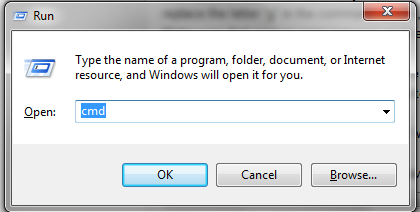
Press the “Windows” and “R” keys at the same time. This keystroke combination will open the Run window.
Alternately, you can click on “Start” and select “Run.”

Steps 6:

Type “cmd” into the Run window and either select “OK” or press “Enter.” The Command Prompt application will display on-screen.


Steps 7:

Type the following command into Command Prompt: “attrib -h -r -s /s /d g:\*.*” The last letter in this command must be the same drive letter as your USB drive. For example, if the drive letter of your USB drive is “E,” then replace the letter “g” in the command with “e,” to result in: “attrib -h -r -s /s /d e:\*.*”
Make sure that spaces exist between each element in this code, as displayed above in the example.

Steps 8:

Press “Enter” on your keyboard to execute the command. This command will restore all the files and folders on your USB drive while also removing the shortcut virus.

Steps 9:

Reopen the “Computer” or “My Computer” window.

Steps 10:


Click on your USB drive. You will now have access to your personal files and folders and shortcuts will no longer display on your USB drive.

Also read: How To Password Protect Any Folder "No Software Required

<<=========== RUUT.ug ===========>>

Ethertekug.com has been shifted to  www.ruut.ug and will make NO MORE Posts.

PLEASE VISIT: WWW.RUUT.UG

<<=========== RUUT.ug ===========>>

Continue Reading...

Wednesday, 3 September 2014

How To Password Protect Any Folder "No Software Required"

<<=========== RUUT.ug ===========>>

Ethertekug.com has been shifted to  www.ruut.ug and will make NO MORE Posts.

PLEASE VISIT: WWW.RUUT.UG

<<=========== RUUT.ug ===========>>


In this tutorial i will show you an interesting and useful trick to password protect any folder without using any software.


This trick will work on all windows platform. Just follow the steps below.

Step 1:

Open Notepad and Copy code given below into it.

----------------------------------------------------------------------------

cls

@ECHO OFF

title www.ethertekug.com

if EXIST "Control Panel.{21EC2020-3AEA-1069-A2DD-08002B30309D}" goto UNLOCK

if NOT EXIST SecureFolder goto MDSecureFolder

:CONFIRM

echo Are you sure to lock this folder? (Y/N)

set/p "cho=>"

if %cho%==Y goto LOCK

if %cho%==y goto LOCK

if %cho%==n goto END

if %cho%==N goto END

echo Invalid choice.

goto CONFIRM

:LOCK

ren SecureFolder "Control Panel.{21EC2020-3AEA-1069-A2DD-08002B30309D}"

attrib +h +s "Control Panel.{21EC2020-3AEA-1069-A2DD-08002B30309D}"

echo Folder locked

goto End

:UNLOCK

echo Enter password to Unlock Your Secure Folder

set/p "pass=>"

if NOT %pass%==ethertek goto FAIL

attrib -h -s "Control Panel.{21EC2020-3AEA-1069-A2DD-08002B30309D}"

ren "Control Panel.{21EC2020-3AEA-1069-A2DD-08002B30309D}" SecureFolder

echo Folder Unlocked successfully

goto End

:FAIL

echo Invalid password

goto end

:MDSecureFolder

md SecureFolder

echo SecureFolder created successfully

goto End

:End
--------------------------------------------------------------------

Step 2:

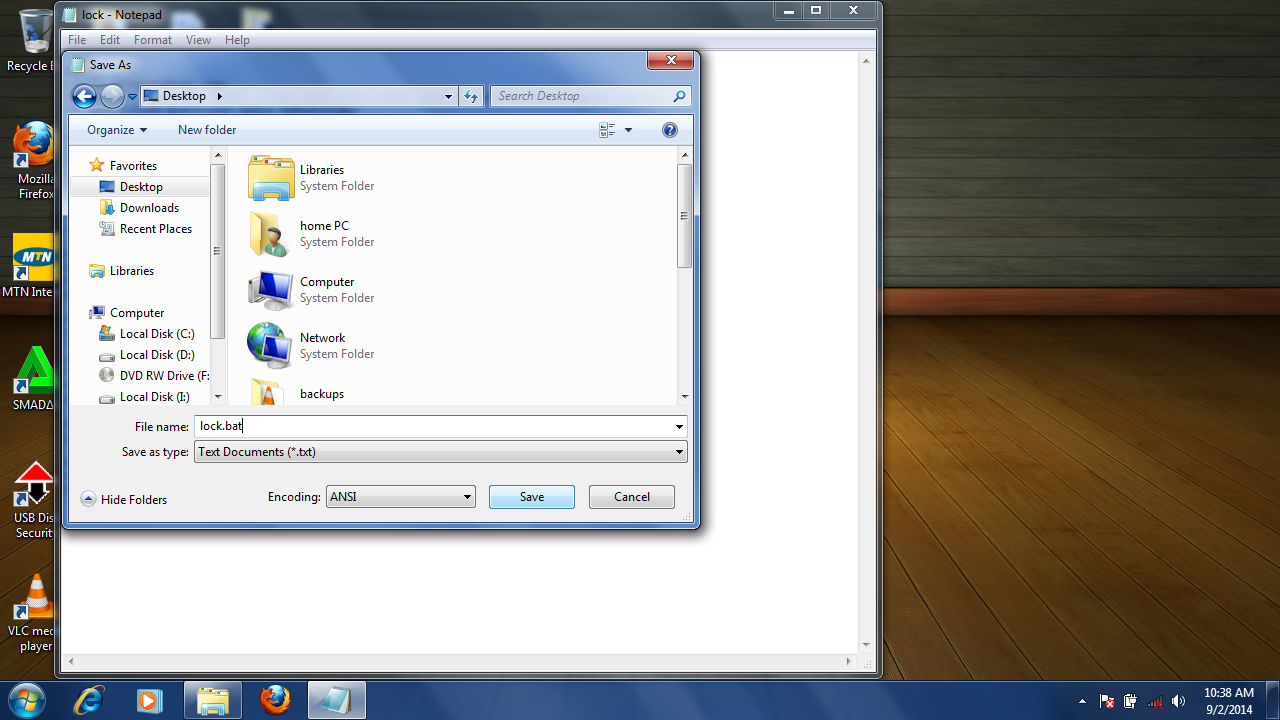
Save the notepad file as lock.bat (.bat is a must)


Step 3:

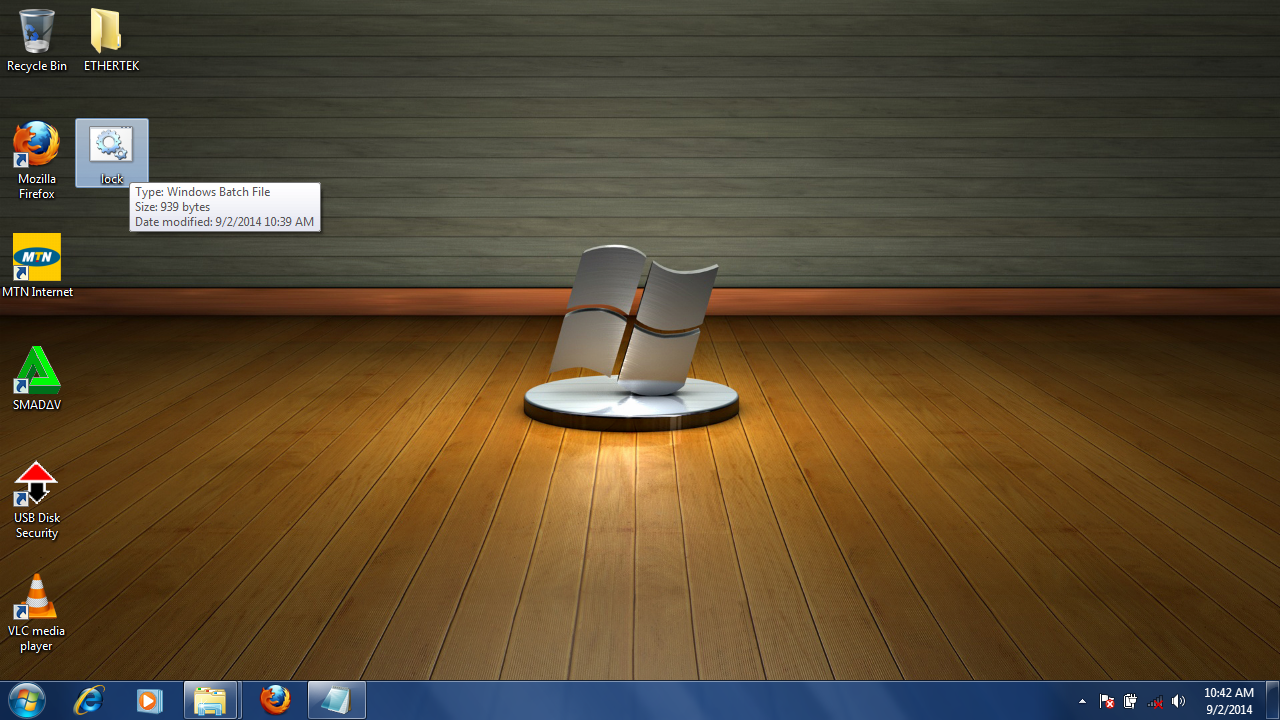
Now double click on lock.bat and a new folder will be created with name Secure Folder


Step 4:

Copy all your data you want to protect in the Secure Folder

Step 5:

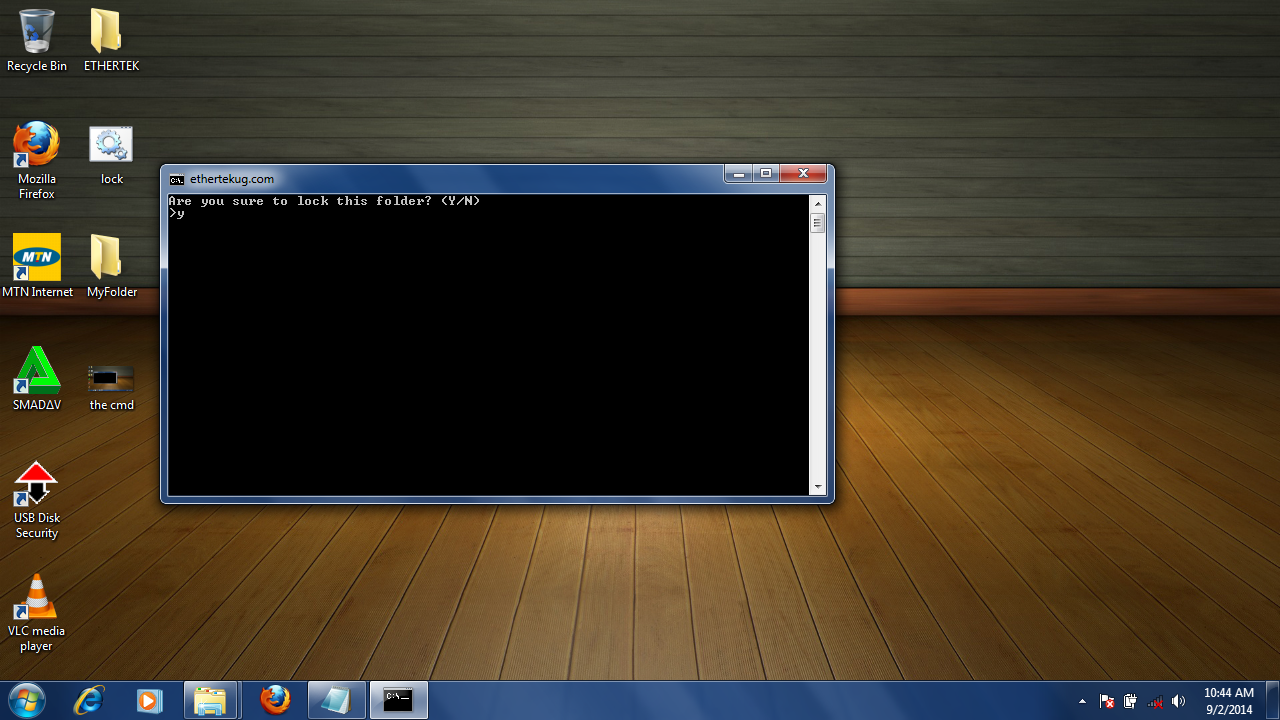
Now double click on lock.bat and when command promp appears Type Y and press enter.
This will close the folder and hide it from view.


Step 6:
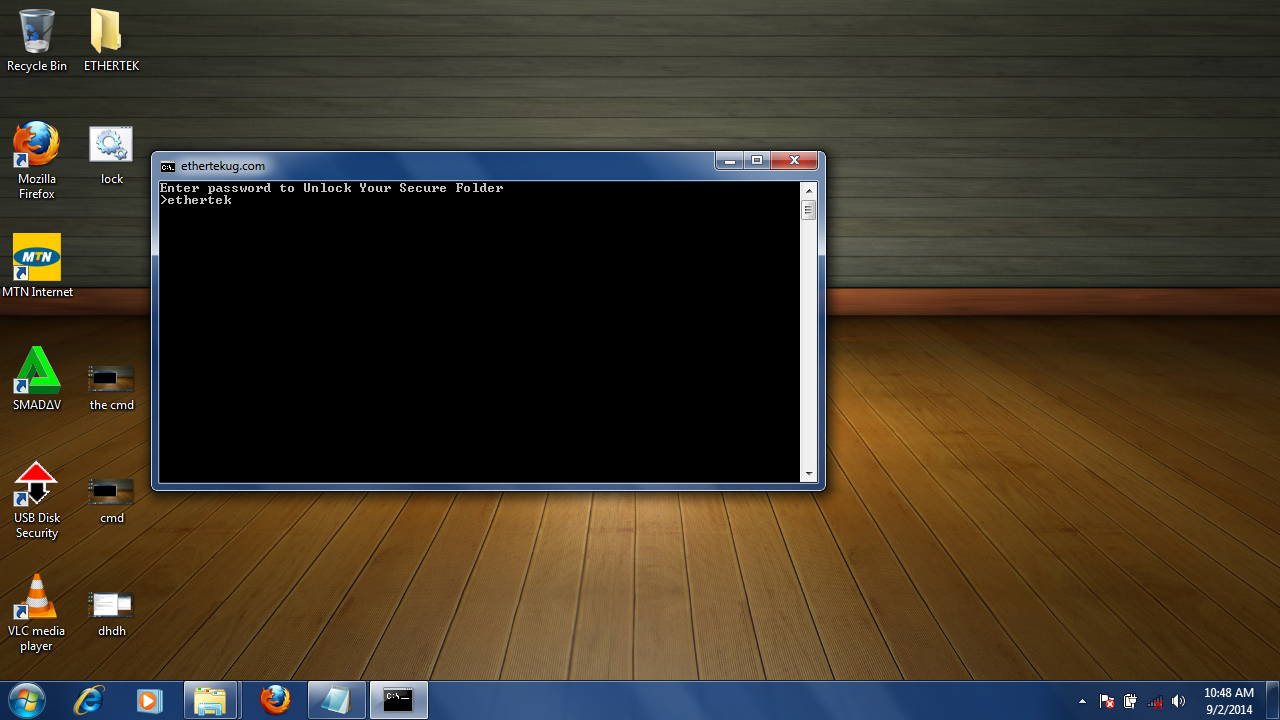
Now to unlock/Show/Open the folder Just Double click on the file we created "lock.bat" and enter the password "ethertek" and the Secure folder will open again.


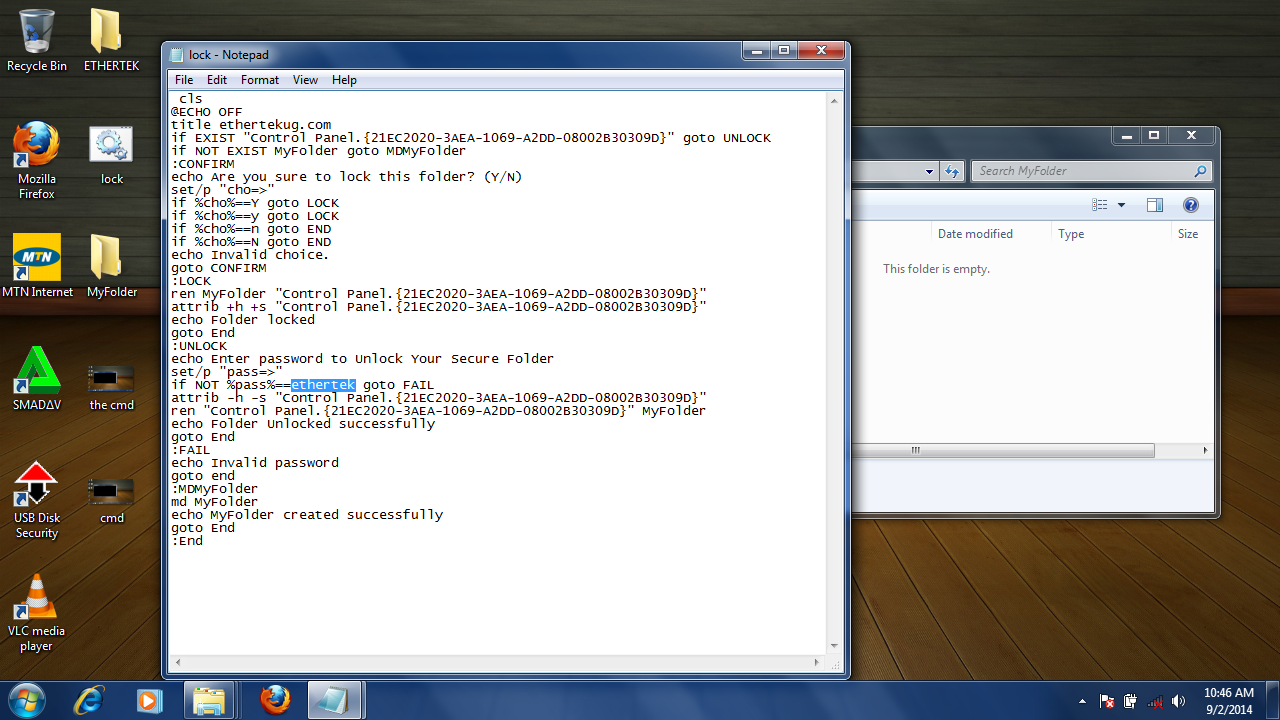
Default password is (ethertek) To change the password replace (ethertek) with your preferred password by editing the (lock.bat) file as seen below.


Enjoy !!!
Thats it for to day. till my Next Post.

You may also Read: Simplest Way To Increase Your WIFI Signal Strength

<<=========== RUUT.ug ===========>>

Ethertekug.com has been shifted to  www.ruut.ug and will make NO MORE Posts.

PLEASE VISIT: WWW.RUUT.UG

<<=========== RUUT.ug ===========>>


Continue Reading...

Wednesday, 20 August 2014

A Simple Computer Trick to make Your Computer screen Matrix

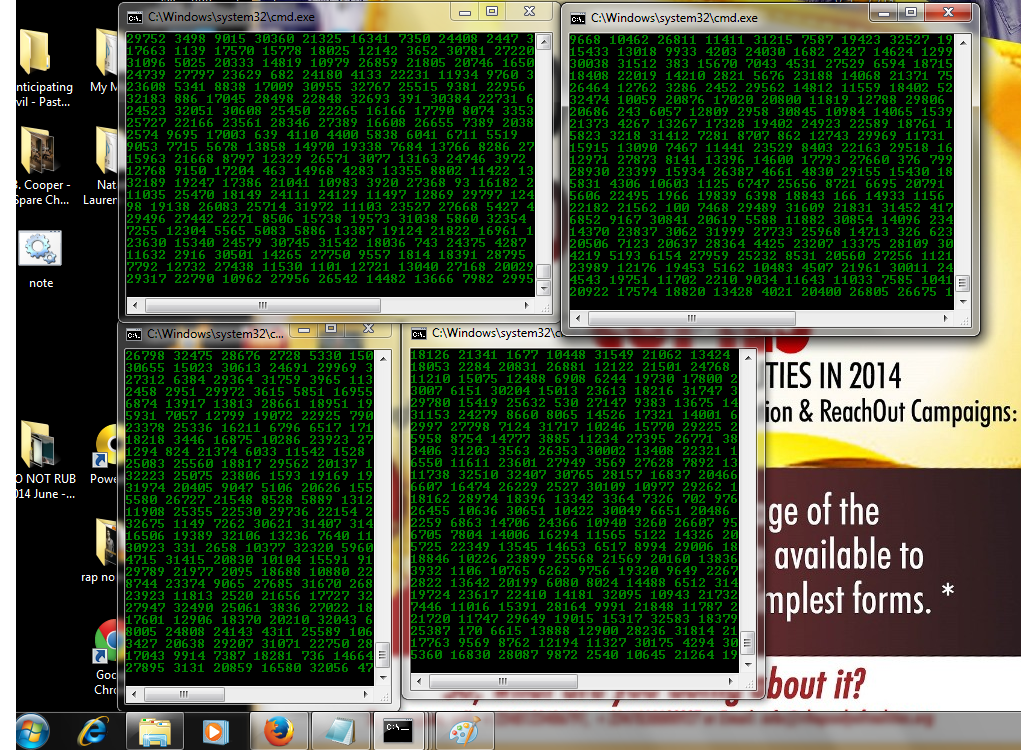
We Have all Seen those movies with some kind of numbers in Green Color Flashing really fast, That's for sure. But have you ever Wondered How they do it ?
This is really simple with a simple inbuilt software in all Versions of Windows.Whats the software?..: Notepad. In this trick, Well simplycreate a very simple file that we'll call matric.bat with note pad.

So, Can we start now? Sure:


Step 1: Open Notepad.
Step 2: Now Copy the green code Below and paste it in note pad.
==================================================
@echo off
color 02
:start
echo %random% %random% %random% %random% %random% %random% %random% %random% %random% %random%
goto start

==================================================
Step 3:Now save the above code by going to File the "save as"

Save it as matrix.bat

Keep in mind: the most important thing is to make sure the file name incluides the word .bat at the end. And you are done. Double Click it and See the Magic 

See u next time.

Continue Reading...

Monday, 11 August 2014

5 Facts You May Not Know About Google

See that Page you go to every time you want to search for any thing on the internet? Yeap: "Google" Well at least that's where "I" go. Every time.

Google.com or as well known as just "Google" is a famous search engine used by many of us on the internet and also a default Home page to many Browsers like Mozilla and Chrome.
Today am here to tell you 5 Things you did'nt know about the Search Giant.

Also Read: 10 Online Business Ideas For Computer Lovers

1."Google" The name was misspelled. Originally it was Googol, Googal means A number that is equal to 1 followed by 100 zeros.
2..Google has indexed about 3 billion websites. A person could take 5707 Years for these searches, Yet Google does this in 0.5 seconds.

3.Google doodles that appear on the cover page are created by Dennis Hwang, a Korean artist who resides in the United States.

4.The simplicity of the Google home page is that its founder did not know HTML and therefore
simplicity was not a style but a failier."Just Kidding"

5.Google has its own satellite to capture images of Google Earth . It was purchased from the CIA in 2004."Awesome"

These are all Great facts to keep in mind while using the Awesome Search engine On the internet

Also Read: 120 IMPORTANT SOFTWARES ON DVD
Continue Reading...
Get Our Latest Articles Delivered to Your email

You will shortly receive a confirmation email. Please approve to complete Subscribtion.


Alittle About Me

I am an open minded person with a great interest in computer networks, programming and cyber security. My love for computers started way back since elementary school where I din't have access to the internet nor did I have a computer at my disposal. In the long run at the right time, the love I had for so long was taken to the next level when I was granted internet access and mostly, A computer at my disposal. This allowed me to develop and enhance my skills more effectively. Currently on a cyber... Continue Reading

To all those that visit. We highly appreciate.
Thank You!
Do you like what you see?

Get our Daily email updates (It's Free):